AI headshot generator that keeps your face
Upload 1–3 selfies, pick a style and get 4 professional headshots for LinkedIn and your CV in about a minute. $0.16 a set, photos deleted after.
Last updated 2026-11-19
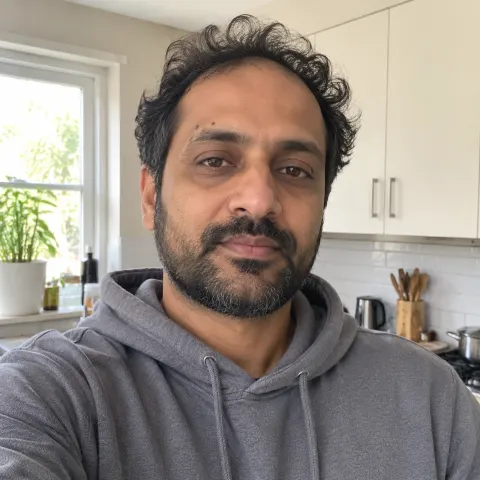 Before
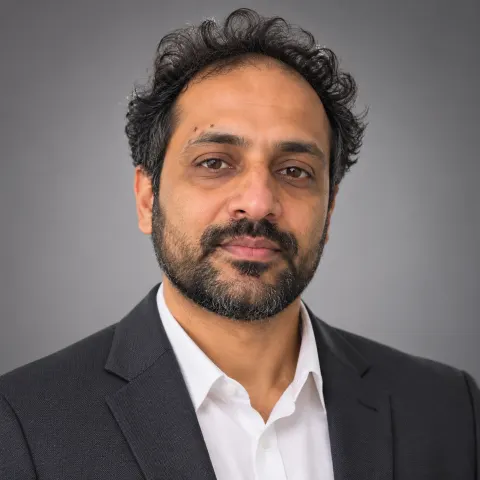 Corporate studio grey
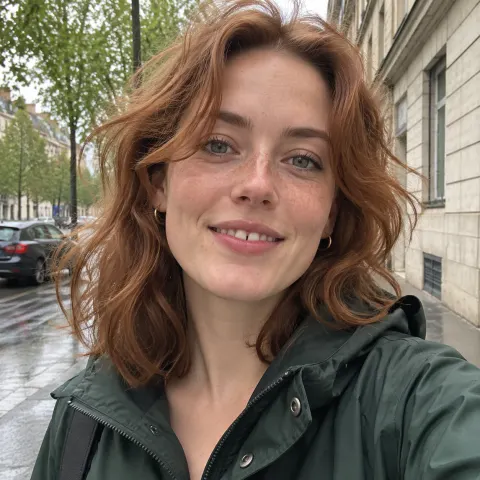 Before
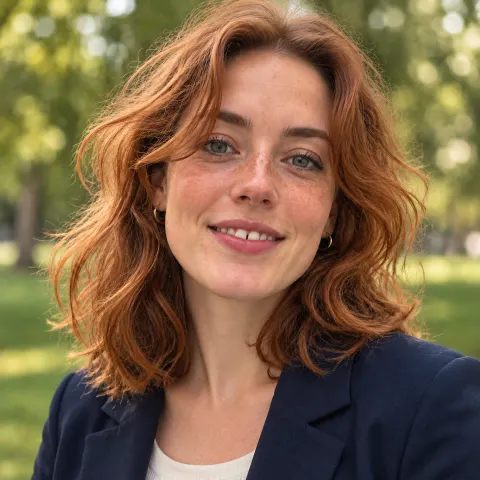 Outdoor natural light
Black Friday deposit bonus
Every qualifying top-up earns free credit, on top of any other offer.
Ends November 30
Short answer: upload 1–3 ordinary photos of yourself, pick a style such as corporate studio grey or outdoor natural light, and Lovely Router makes 4 professional headshots that keep your face, ready for LinkedIn, a CV or a company page. A set costs $0.16 ($0.04 per headshot) with the default model, and your uploaded photos are deleted as soon as the headshots are made.
- Price
- $0.16 for 4 headshots with GPT Image 2; $0.24 with GPT Image 2.6, $0.3428 with Gemini 3 Pro Image; shown before you start
- Time
- about a minute for a set of 4
- Styles
- corporate studio grey, outdoor natural light, tech startup casual, executive dark, clean white for CVs, LinkedIn banner-friendly (3:2)
- Likeness
- 0.94 face-embedding similarity to the upload in our test (GPT Image 2, two fictional faces)
- Privacy
- uploads used only for your headshots, deleted when they are done (at most 24 hours); results stay until you delete them
- Account
- free sign-up, prepaid credit, no subscription; your first top-up is matched up to $5
A good headshot used to mean booking a photographer. Now a selfie taken by a window is enough: an image model that edits from your own photos keeps your face, hair and features, and changes the rest — the clothes, the light, the background — into a professional portrait. You pick the style, see the price, and get 4 headshots to choose from.
Hand it to your AI agent
Copy this prompt into Claude Code, Cursor, Codex or any coding agent. It tells the agent where the docs are and how to use your API key.
Make professional headshots of me with the Lovely Router headshots API from photos of myself.

- Docs (read first): https://lovelyrouter.com/docs/models/images.md
- POST https://lovelyrouter.com/v1/headshots as a multipart form: `style` (studio-grey, outdoor, tech-casual, executive, clean-white or banner), `attest=true` (I confirm the photos are of me and I am 18+; ask me before sending it) and 1–3 photos of me as `image`. Poll GET https://lovelyrouter.com/v1/headshots/{id}?wait=60 until `status` is `done`, then save each image from GET https://lovelyrouter.com/v1/headshots/{id}/images/{i}.
- 4 headshots per set, billed per image at the model's image price (default gpt-image-2); only photos of me, never anyone else.
- Auth: read my API key from the LOVELY_API_KEY environment variable and send it as `Authorization: Bearer $LOVELY_API_KEY`. Never print or commit the key. If it is not set, ask me to create one at https://lovelyrouter.com/app/keys.
- Billing is prepaid: every call is charged to my balance, so test with a small request before running anything large.
- Every docs page is plain Markdown; the full index is https://lovelyrouter.com/llms.txt.

My task: <which photos of you to use and the style you want>
How it works
Upload 1–3 photos of yourself
Recent photos of you alone, face clearly visible, in good light, without sunglasses. Selfies work. The first photo is the main reference, so put your best one first; more photos from other angles help the model get your face right.
Pick a style and a model
Six professional styles, all head-and-shoulders portraits in business clothing. The default model, GPT Image 2, stayed closest to the original face in our test; Gemini 3 Pro Image varies the pose and smile more but drifts further from your likeness.
Confirm and generate
Tick "These are photos of me and I'm 18+", check the price on the button and start. Four headshots arrive in about a minute, each in a slightly different pose and expression. Download the ones you like; for the banner style, one click crops a 1584×396 LinkedIn banner.
Six professional styles
A charcoal blazer, a seamless grey backdrop and soft studio light: the classic LinkedIn and company-page headshot.
Smart casual in late-afternoon daylight against blurred greenery: warm and approachable.
A plain sweater or overshirt in a bright modern office: the team-page look.
A dark suit, low-key light and a deep charcoal background: for leadership bios and speaker pages.
A plain top on a white background with even light: fits CVs, applications and ID-style photos.
A wide 3:2 portrait with you on the right and calm space on the left, ready to crop into a profile banner.
Your photos, your responsibility, your privacy
You confirm the photos show you and that you are 18 or older; that confirmation is recorded with your headshots and you take responsibility for it. There is no option to make headshots of celebrities or anyone else.
You choose a style, not a prompt: every style is a clothed, business-appropriate portrait, and the image models' own safety filters stay on.
Your photos are used only to make your headshots and are deleted as soon as they are made, at most 24 hours later. They are never used for training or anything else.
Your headshots stay in your account until you delete them; deleting a set removes every copy.
What it costs
| Model | Per headshot | Set of 4 |
|---|---|---|
| GPT Image 2 (default) | $0.04 | $0.16 |
| GPT Image 2.6 | $0.06 | $0.24 |
| Gemini 3 Pro Image | $0.0857 | $0.3428 |
All prices: pricing.
You pay from a prepaid balance, the same one used for every model on Lovely Router; there is no subscription. The exact price is on the button before you generate, and a headshot that fails is not charged. Your first top-up is matched up to $5, so a minimum top-up covers many sets.
Tips for LinkedIn and job applications
Recruiters meet you on video calls; a headshot that flatters too much works against you.
LinkedIn shows profile photos as a circle from a square image (at least 400×400); the square styles are made at 1024×1024 or larger.
Make a LinkedIn banner-friendly set and use the banner crop on the one you like.
Studio grey or clean white suits most applications; outdoor and tech casual suit startups and creative roles.
If an employer or a photo rule asks whether a picture is AI-made, say so.
Use it from code
The generator runs on a public API, so an app or agent can make headshots for its own users (with their consent) through POST https://lovelyrouter.com/v1/headshots: a multipart form with style, attest=true (the person confirms the photos are of them and that they are 18+) and 1–3 photos as image. Poll GET /v1/headshots/{id} until status is done; each image is at GET /v1/headshots/{id}/images/{i}.
curl https://lovelyrouter.com/v1/headshots \
  -H "Authorization: Bearer $LOVELY_API_KEY" \
  -F style=studio-grey \
  -F attest=true \
  -F image=@selfie.jpg
Styles: studio-grey, outdoor, tech-casual, executive, clean-white, banner. Optional model: gpt-image-2 (default), gpt-image-2.6-flare, gemini-3-pro-image. DELETE /v1/headshots/{id} removes a set.
Frequently asked questions
What is a cheap AI headshot generator for LinkedIn?+
Lovely Router makes 4 professional headshots from 1–3 of your own photos for $0.16 a set with GPT Image 2 ($0.04 per headshot), in about a minute, with no subscription. You pick one of six styles, including corporate studio grey and a LinkedIn banner-friendly wide frame, and see the exact price before you start.
Will an AI headshot look like me?+
It is made by editing your own photos, so it keeps your face shape, eyes, skin tone, hair and features such as freckles or a beard. In our test on two fictional faces, GPT Image 2's headshots matched the original face at 0.94 cosine similarity on a face-recognition embedding (0.80 for Gemini 3 Pro Image). Clear, well-lit photos without sunglasses give the closest results.
Are my photos deleted?+
Yes. Uploaded photos are used only to make your headshots and are deleted as soon as they are made, at most 24 hours later; they are never used for training or anything else. The finished headshots stay in your account until you delete them.
Can I use an AI headshot on my CV or job application?+
Yes, as long as it looks like you. Choose the most natural of your 4 headshots, prefer plain styles such as studio grey or clean white, and say it is AI-made if an employer or a photo rule asks. Official ID photos usually have their own rules: follow those.
Can I make headshots of someone else?+
No. You confirm that the photos are of you and that you are 18 or older, and there is no option for celebrities or other people. An app using the API must have each person's own consent and pass attest=true for them.
What photos give the best headshots?+
One to three recent photos of you alone, face fully visible and in focus, soft daylight, no sunglasses or heavy filters. Put the clearest, front-facing one first: it is the main reference.
How long does it take, and what if one fails?+
About a minute for a set of 4. A headshot that fails is not charged, and the set shows which ones were made.
Make your headshots in a minute: start here, or read how image generation and edits work on Lovely Router.
A professional headshot in a minute
Upload a selfie, pick a style, see the price before you pay. Your photos are deleted as soon as your headshots are made.